
GolfLogix Golf GPS + 3D Putts
GolfLogix Golf GPSSports
2.23.56K Reviews
- Version
- 10.0.7
- Installs
- 1.00M
- Age Rating
- Everyone
Screenshots
Our Review of GolfLogix Golf GPS + 3D Putts
 Analysis by Appyee
On a round when I’m trying to make better decisions rather than simply collect more numbers, a golf GPS app is most useful when it fits quietly into my routine. GolfLogix is designed for that role, combining course navigation with tools for scoring and reading greens. I’d treat it as a practical companion, not a substitute for course knowledge or practice: its value depends on checking the right information at the right moment and keeping the phone from becoming a distraction.
A round that stays organized
My preferred workflow is simple: get the course ready before play, check the distance when I reach a decision point, then record the score while the hole is still fresh in my mind. That rhythm matters more than opening every feature on every shot. When a group is waiting, I want one quick glance at useful yardage, not a prolonged phone session that slows everyone down.
GolfLogix is a free sports app from GolfLogix Golf GPS, and its focus is clearly on helping golfers use GPS information alongside scoring and green tools. The app has been around since May 19, 2010, and version 10.0.5 is listed for devices running Android 6.0 or later. It is rated for Everyone, though a parent should still consider ordinary phone use and any account setup before handing it to a child.
Make the phone part of the routine, not the round
A useful habit is to check the app before leaving home or the clubhouse, rather than waiting until you are standing on the tee. That gives you a chance to confirm that the course and the information you need are ready. On the course, I’d keep the phone accessible but avoid checking it automatically after every shot; the app is most helpful when it answers a real question, such as how much room remains before choosing a club.
That approach also helps with battery and attention. GPS use can be demanding on a phone, so starting with a charged device and limiting unrelated screen use is sensible for any full round. I would not assume a phone will last equally well in every situation: battery condition, screen brightness, signal conditions, and other apps all affect how long it stays useful. A dedicated golf GPS device may suit someone who wants a purpose-built screen and fewer phone distractions.
Where the course tools earn their place
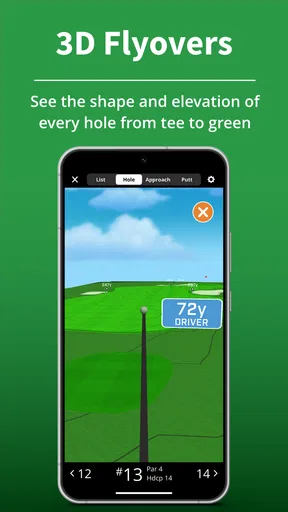
I find the course tools most useful when they help me make one clear choice, rather than invite me to inspect every screen. A quick look at the layout can help me settle on a safer target before I reach the ball, while a green view can give me a starting point for my own read. That balance is worth keeping in mind as I look at which settings and habits make the information easier to use.
Distances are useful only when they change a decision
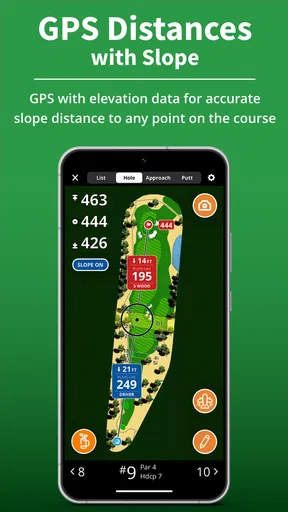
The GPS side is most valuable when I use it to think through a shot, not just to admire a precise-looking number. A distance can help compare clubs or choose a conservative target, but it cannot account for every variable in a swing. Wind, lie, temperature, the ball’s position, and how confidently I can make the shot still matter. I’d combine the app’s yardage with my own club distances instead of treating GPS guidance as a command.
For a golfer who already knows their typical carry distances, the practical payoff is better course management: choosing a safer landing area or avoiding a club that brings trouble into play. A newer player may find the same information helpful for learning how holes are laid out, but should avoid assuming that a map automatically makes a difficult shot wise. Sometimes the best decision is to aim short of a hazard and accept a longer next shot.
Green maps call for a careful second opinion
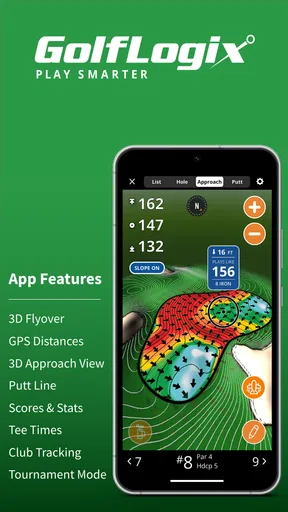
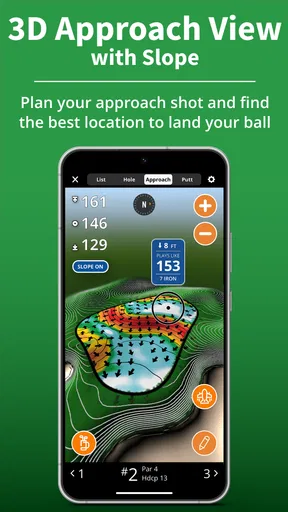
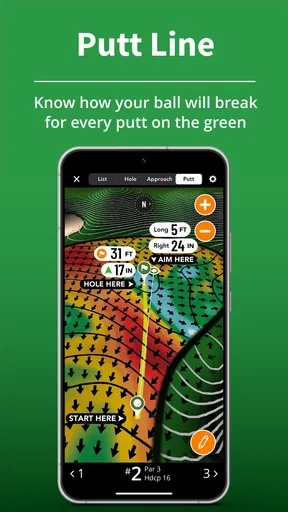
The 3D green maps are appealing because they make slopes and breaks easier to picture than a flat scorecard can. I’d use them to form a first read, then check the actual green from behind the ball and, when practical, from the side. Surface condition and the day’s pin position can change what a putt does, so a screen view should support observation rather than replace it.
There is a helpful practice opportunity here: after a putt, compare the result with the line you expected and remember whether the miss came from aim, pace, or an imperfect read. That turns the map into a prompt for learning instead of a promise of a made putt. Golfers who prefer to read greens entirely by feel may find the visual layer unnecessary, while players who struggle to picture slope could welcome the extra perspective.
Scoring and stats work best when they stay honest
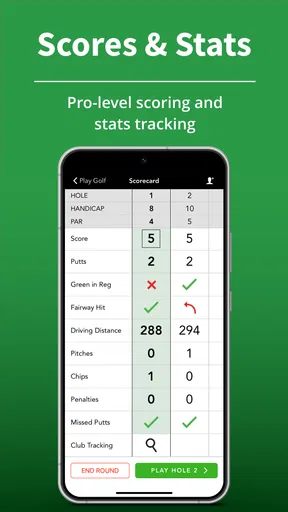
A digital scorecard is convenient when I enter each hole promptly, especially if I’m playing with friends and want to keep the round moving. Performance tracking can also make practice more focused: rather than saying “my putting was bad,” I can look for a pattern in the figures I chose to record. Still, a stat only helps if it is entered consistently. If I skip details on busy holes, I should not draw strong conclusions from an incomplete record.
For a useful comparison over time, I’d keep the same habits from round to round and focus on one question at once, such as whether approach shots are leaving manageable putts. The temptation is to track everything and then never review it. A small set of reliable notes can be more actionable than a long record gathered inconsistently. Sharing stats with friends can add a social angle, but I’d use it for friendly motivation rather than as a substitute for personal goals.
Costs, expectations, and who should take a closer look
The app is free to download, with in-app purchases ranging from $0.99 to $59.99 per item. That makes it worth checking which tools are available at no cost and what a particular purchase unlocks before spending. I would decide based on a real need—such as a feature I expect to use repeatedly—rather than buying simply because an upgrade is offered. The average rating is 2.2 from around 12,000 ratings, alongside roughly 3,600 written reviews, so I would approach it with measured expectations and test my own routine before relying on it for every round. It has more than 1 million installs, but popularity alone does not settle whether its workflow suits you.
Compared with a basic distance-only golf GPS, GolfLogix aims to bring more of the round together through green visuals, scoring, and performance tracking. That broader toolkit can be useful if you like reviewing your play, but it also means more to learn and more screen interaction than a simple rangefinder or dedicated GPS unit. If all you want is a quick yardage, a simpler option may be easier. If you prefer a paper card and instinctive green reading, you may not get enough from the additional layers to justify changing habits.
What to check before relying on it
Before a round, I’d confirm that the course I’m playing is available and that the specific tools I plan to use are accessible in the version I have. I’d also check whether my phone is comfortable to handle outdoors and whether I can read its screen without holding up play. Those small checks answer practical questions better than discovering a problem at the first tee. If someone asks whether the app replaces a rangefinder, my answer is that it can cover a different kind of need: an app combines course information and record-keeping, while a dedicated device may be preferable for a quick, single-purpose measurement.
For a casual weekend round, I might use the map to plan a conservative tee shot, check a distance before choosing a club, and enter the score after the hole. Later, I could review one recurring issue rather than judge the whole round by its final number. That is a realistic way to get value without turning golf into a data-entry exercise. Players who compete under specific rules should also make sure their chosen tools are permitted in their format before using them during play.
Getting Started with GolfLogix
First things first, let's talk about the setup. Downloading the app was a breeze; it's available on both Android and iOS, so no worries there. Once installed, I was greeted with a sleek interface that was easy to navigate, even for someone who's not a tech whiz. Setting up my profile took just a few minutes, and I was ready to hit the virtual greens.
The GPS Accuracy
One of the standout features of GolfLogix Golf GPS + 3D Putts is its GPS capability. I was genuinely impressed with how accurate the GPS was. Whether I was teeing off or lining up for a tricky putt, the app provided precise yardage to the hole. It even accounted for elevation changes, which is a huge plus! Having real-time data at my fingertips felt like having a professional caddy by my side.
Exploring 3D Green Maps
Now, let's talk about the 3D putt maps. This feature is nothing short of revolutionary. The detailed green maps show slopes and breaks, helping you read putts like a pro. The first time I used it, I was amazed at how much easier it was to visualize my putting line. The app even suggested where to aim, which significantly improved my accuracy on the greens.
Performance Tracking and Stats
I'm a bit of a stats geek, so I loved the performance tracking features. The app keeps tabs on everything – fairways hit, greens in regulation, putts per hole, you name it. Having all this data helped me identify the areas I needed to focus on to lower my scores. Plus, the app allows for easy sharing of your stats with friends, adding a fun, competitive edge to your rounds.
User Experience and Interface
The user experience is smooth and intuitive. Navigating between different features was simple, and the app didn’t lag or crash, which is often a concern with feature-rich apps. The design is clean, with an easy-on-the-eyes color scheme that makes prolonged use comfortable, even under the bright sun on the course.
Additional Features
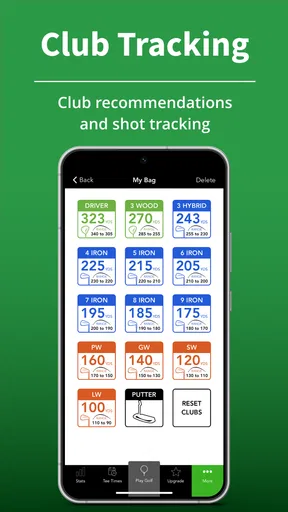
Apart from the core functionalities, GolfLogix offers several other handy features. The digital scorecard is a nice touch, keeping your scores organized and easily accessible. There’s also a club tracking feature that helps you keep track of your shots with different clubs, providing insights into your performance with each one. And if you’re someone who likes to plan, the app offers comprehensive course maps for thousands of courses worldwide, allowing you to strategize before even setting foot on the green.
Final Thoughts
After using GolfLogix Golf GPS + 3D Putts for several rounds, I can confidently say it’s a must-have for any golf enthusiast. The combination of accurate GPS, insightful 3D putt maps, and comprehensive performance tracking makes it a powerful tool for improving your game. Sure, it might take a round or two to get used to all the features, but once you do, it's like having a personal coach in your pocket. So, if you're serious about shaving strokes off your game, give GolfLogix a shot – you won’t regret it!
Verdict
Strengths of GolfLogix Golf GPS + 3D Putts
- Accurate GPS for precise course mapping.
- Detailed 3D green views enhance strategy.
- User-friendly interface for easy navigation.
- Tracks scores and stats automatically.
- Large database of worldwide courses.
Limitations of GolfLogix Golf GPS + 3D Putts
- Requires premium for full feature access.
- Occasional GPS signal loss in remote areas.
- Heavy battery usage during long rounds.
- Ads in the free version can be intrusive.
- Limited offline functionality.
Similar Picks in This Category
View All
BeSoccer: Soccer Live Score
BeSoccer apps4.3

Cricbuzz - Live Cricket Scores
Cricbuzz.com3.7

NFL
NFL Enterprises LLC2.4

Da Fit
MO YOUNG LIMITED3.6

ESPN
Disney4.5

LiveScore: Live Sports Scores
LiveScore Limited4.5
Frequently Asked Questions
What features does GolfLogix Golf GPS + 3D Putts offer?
GolfLogix Golf GPS + 3D Putts provides a comprehensive golfing experience with features like detailed GPS mapping, accurate distance measurements, and 3D green maps. It also includes advanced putt line visualization and score tracking, making it easy to improve your game. The app offers both free and premium features tailored to casual and serious golfers.
Is GolfLogix compatible with my device?
GolfLogix is available for both Android and iOS devices. To ensure compatibility, your device should run on Android 6.0 or higher, or iOS 12.0 or later. The app is designed to work seamlessly on most smartphones and tablets, delivering a smooth user experience with minimal technical issues.
Does the app require a subscription for full access?
While GolfLogix offers a range of free features, a subscription is required to unlock premium content such as advanced 3D maps and personalized distance calibrations. The subscription options are flexible, allowing users to choose between monthly or annual plans. Many users find the premium features worth the investment for enhanced gameplay.
How accurate is the GPS and 3D mapping?
GolfLogix is known for its precise GPS and 3D mapping capabilities. The app uses advanced technology to ensure accuracy, providing golfers with reliable distance measurements and detailed course layouts. Users have reported high satisfaction with the app's ability to enhance their understanding of the course and improve their performance.
Can I use GolfLogix offline?
GolfLogix requires an internet connection for initial setup and downloading course maps. However, once maps are downloaded, the app can operate offline, allowing you to access essential features like GPS and score tracking without needing a constant internet connection. This is particularly useful for courses with limited connectivity.
